8 Best Evaboot Alternatives:Features, Pricing & Best Fit


Updated on: October 16th, 2026
Looking for an Evaboot alternative? The right replacement depends on what you need to do with your leads after exporting them from LinkedIn Sales Navigator.
If you only want to extract contacts, clean the data, and find business email addresses, a dedicated prospecting tool may be exactly what you need.
But what if you also want to enrich lead data using AI, automate LinkedIn and email outreach, and have AI handle conversations with interested prospects?
That's where the differences between Evaboot alternatives become much more important.
We've compared eight tools based on their prospecting capabilities, AI data enrichment, outreach automation, AI SDR features, pricing, and limitations.
The goal? Help you choose a tool that fits your workflow, without paying for features you won't use.
TL;DR: The best Evaboot alternatives in 2026
Here are our picks based on what you're trying to accomplish:
- Skylead: Best for sales teams and agencies that want prospecting, AI data enrichment, LinkedIn and email outreach, and AI SDR capabilities in one platform.
- Wiza: Best for finding verified emails and phone numbers from LinkedIn prospects and enriching lists with AI research.
- Emelia: Best for combining LinkedIn and cold email automation with AI-assisted prospecting and replies.
- Bardeen: Best for teams that want customizable scraping, research, and enrichment workflows across applications.
- Skrapp: Best for email discovery, verification, and enriching LinkedIn prospect lists.
- LeadLoft: Best for smaller sales teams looking for CRM, outreach automation, and AI SDR features.
- PhantomBuster: Best for building flexible data extraction and automation workflows across LinkedIn and other platforms.
- GetProspect: Best for verified B2B contact discovery, email enrichment, and cold email sequences.
Our recommendation: If you're replacing Evaboot because you want to go beyond lead extraction and run your outbound workflow in one place, consider Skylead, Emelia, or LeadLoft first.
If your main priority is exporting contacts and enriching their data, Wiza, Skrapp, GetProspect, and PhantomBuster may be more suitable.
How we evaluated these Evaboot alternatives
Not every tool on this list is a direct Evaboot replacement.
Some specialize in extracting Sales Navigator data. Others help you enrich contacts or automate outreach. A few bring those capabilities together in a broader sales platform.
So, instead of comparing them by feature count alone, we used four main criteria.
1. Prospecting
Can you discover leads within the platform, import Sales Navigator prospects, extract information, and build targeted lists?
We also considered how dependent each tool is on an existing LinkedIn or Sales Navigator subscription.
2. AI data enrichment
Can the tool find and verify emails, add company information, research prospects, or use AI to generate relevant context?
An AI-powered research feature is not automatically the same as multi-provider contact enrichment, so we've made those distinctions.
3. Outreach automation
Can you build automated LinkedIn and email sequences, apply conditions, personalize messages, and manage replies?
We considered whether outreach is built into one platform or requires combining separate workflows and integrations.
4. AI SDR
Can AI do more than write a first message?
For this comparison, we distinguish between AI copywriting, AI-generated reply suggestions, and AI agents that can respond to leads, qualify interest, follow up, and help book meetings.
About our research and testing
We reviewed the vendors' public product information, feature documentation, and pricing pages in October 2026. We also incorporated our team's hands-on observations of each tool. Prices and plan allowances were checked in October 2026 and may change.
Evaboot alternatives compared: Features and pricing
| Tool | Best for | Prospecting | AI data enrichment | Outreach | AI SDR | Starting price |
|---|---|---|---|---|---|---|
| Skylead | End-to-end B2B outbound | B2B database, ABP, Sales Navigator leads, post signals | Contact/company enrichment and AI prompts; paid add-on | LinkedIn + email Smart Sequences | Yes | $100/seat/month |
| Wiza | Contact finding and qualification | LinkedIn and Sales Navigator, Wiza Prospect | AI Research, email and phone enrichment | Primarily data-to-CRM workflows | No | Free; paid from $49/user/month |
| Emelia | Multichannel prospecting | Sales Navigator and list sourcing | Email, phone and AI enrichment | LinkedIn + email sequences | AI-suggested replies and automated follow-ups only | €37/month |
| Bardeen | Custom data workflows | Web scraping and automated research | AI qualification and enrichment | Workflow integrations, rather than a native combined sales inbox | No | From $10/month |
| Skrapp | Email discovery and enrichment | LinkedIn, Sales Navigator, database search | AI enrichment on paid plans | Limited LinkedIn actions and CRM handoff; not a full multichannel sequencer | No | Free; paid from $39/month |
| LeadLoft | Sales engagement and CRM | B2B database, LinkedIn prospecting | Lead enrichment and AI Prospector | LinkedIn + email automation | Yes; Scale AI plan | $99/user/month |
| PhantomBuster | Flexible scraping and automations | LinkedIn and 15+ other platforms | LinkedIn data, AI workflows, external email enrichment | LinkedIn flows and connected automations | No | From $56/month, billed annually |
| GetProspect | B2B contact data and email outreach | B2B database, LinkedIn extension | Contact and CSV enrichment; verification | Native cold email sequences | No | Free; paid from $49/month |
Pricing note: Figures are displayed in the currencies shown on the vendors' public pricing pages. Annual-billing discounts, optional credits, connected accounts, and extra tools can affect your final cost. “AI SDR” refers to conversation-management capabilities, not merely generating sales copy.
What is Evaboot, and why look for an alternative?
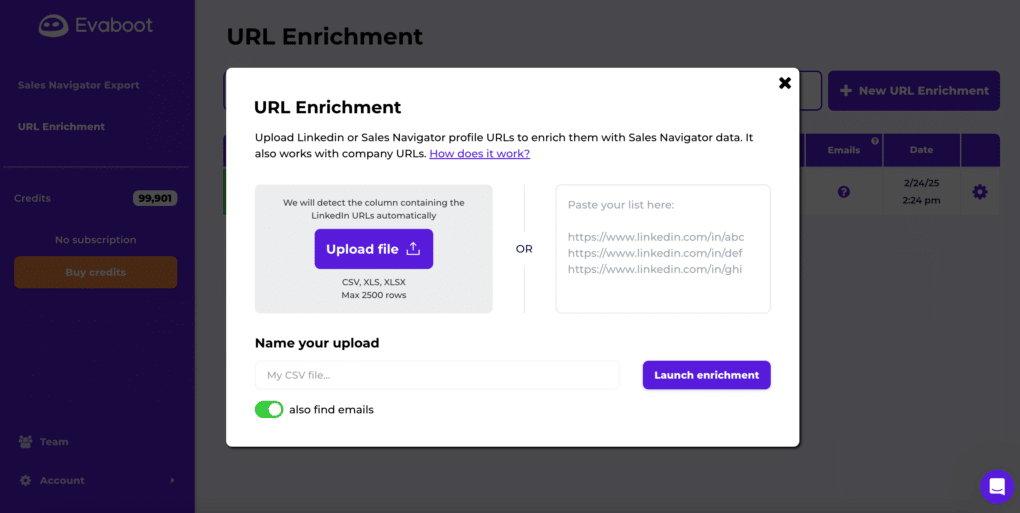
Evaboot is a LinkedIn Sales Navigator extraction and data-cleaning tool.
Its main purpose is to help sales teams turn Sales Navigator search results into usable prospect lists.
It can:
- Export leads and companies from LinkedIn Sales Navigator.
- Clean profile and company information.
- Remove or filter irrelevant records.
- Find business email addresses during lead exports.
- Verify emails.
- Enrich LinkedIn profile URLs.
- Transfer data into other systems through integrations, APIs, and webhooks.
These capabilities make Evaboot useful if you already know who you want to target and primarily need to prepare their data.
However, Evaboot is not designed to manage the entire sales engagement process.
Where Evaboot may not be enough
1. It doesn't replace an outreach platform.
Evaboot helps prepare prospect data. However, it doesn't provide the same end-to-end LinkedIn and cold email sequencing workflow as a dedicated sales engagement tool.
If you want to contact prospects, automate follow-ups, or manage conversations, you'll need additional software.
2. Its core prospecting workflow depends on Sales Navigator.
To use Evaboot's Sales Navigator export capabilities, you need an active LinkedIn Sales Navigator subscription.
That subscription is a separate cost from Evaboot.
3. Its enrichment scope differs from broader sales platforms.
Evaboot provides email finding, verification, LinkedIn URL enrichment, and data cleaning.
But if you want to research companies across multiple data sources, find buying signals, generate personalized insights, or automatically use enrichment outputs in an outreach sequence, you'll need to compare its capabilities with more comprehensive tools.
4. It uses credits for data operations.
Credit-based pricing can be economical when you're exporting a defined number of leads. But the total cost will depend on the number of records and additional tools involved in your workflow.
Evaboot pricing in 2026
Evaboot currently advertises these monthly plans:
| Plan | Price | Included credits |
|---|---|---|
| Entry | $29/month | 400 |
| Standard | $49/month | 1,000 |
| Higher volume | $99/month | 3,000 |
| Enterprise | Custom | Custom |
Evaboot's credit system is important to understand:
- Exporting one lead costs one credit, with email discovery included.
- Exporting one company costs one credit.
- Standalone email discovery costs one credit per email found.
- Standalone email verification costs one credit per address checked.
- LinkedIn URL enrichment costs one credit per URL.
An export attempts to find the lead's email, but an email isn't guaranteed to be found for every contact. The exported lead still consumes a credit.
For example, a 1,000-credit plan supports approximately 1,000 lead exports, rather than only 500 leads with emails as an outdated two-credit calculation would suggest.
See Evaboot's pricing and for the details.
Now that we've established what Evaboot offers, let's compare your alternatives.
1. Skylead - Best for prospecting, enrichment, LinkedIn and email outreach, and AI SDR
Best for: Sales teams, recruiters, founders, and agencies that want to turn prospect lists into conversations using one platform.
Pricing: $100 per seat/month; AI enrichment and AI SDR demonstrate real provider's cost, making it 95% cost-effective than other tools - $1 per 100 credits.
Free trial: 7 days.
Yes, that's us. 👋
Skylead is a cloud-based LinkedIn automation tool and cold email software that brings multiple stages of outbound sales into one workflow.
While Evaboot is primarily designed to extract and prepare prospect data, Skylead helps teams discover prospects, enrich their data, build outreach sequences, and manage replies.
That makes it a stronger fit when you're looking to reduce the number of tools involved in getting from a prospect list to a booked meeting.
Prospecting: Find leads and accounts in one place
Skylead offers several ways to build your prospect list.
With account-based prospecting, you can start by identifying target companies and finding relevant decision-makers inside those organizations.
Its B2B Database also lets you search for contacts and companies using filters.
If you already use LinkedIn Sales Navigator, you can bring Sales Navigator-sourced leads into Skylead campaigns without having to rely exclusively on a separate data-export tool.
And with Post Signals, you can identify prospects based on the topics, keywords, and problems they're discussing or engaging with on LinkedIn.
For example, a sales team targeting companies interested in a specific CRM integration could use account criteria and relevant buying discussions to refine its prospecting.
Compared with Evaboot: Skylead focuses on building an actionable prospecting and outreach workflow.
AI data enrichment: Research, enrich, and personalize
Skylead's AI data enrichment is designed to help you go beyond basic contact records.
Depending on the enrichment action, you can:
- Enrich contact and company information.
- Research company attributes and relevant business context.
- Discover available company signals, such as funding or technology information.
- Use AI prompts to generate structured insights or personalized icebreakers.
- Apply execution conditions to selected enrichment actions.
- Use enriched information in subsequent outreach.
Instead of manually transferring data between a research tool, spreadsheet, and outreach platform, you can work with enriched lead data inside Skylead.
Compared with Wiza or Skrapp: Those tools focus strongly on obtaining and enhancing contact data. Skylead's advantage is the connection between enrichment and outbound campaign execution.
Outreach: LinkedIn and email Smart Sequences
This is where Skylead differs most from Evaboot.
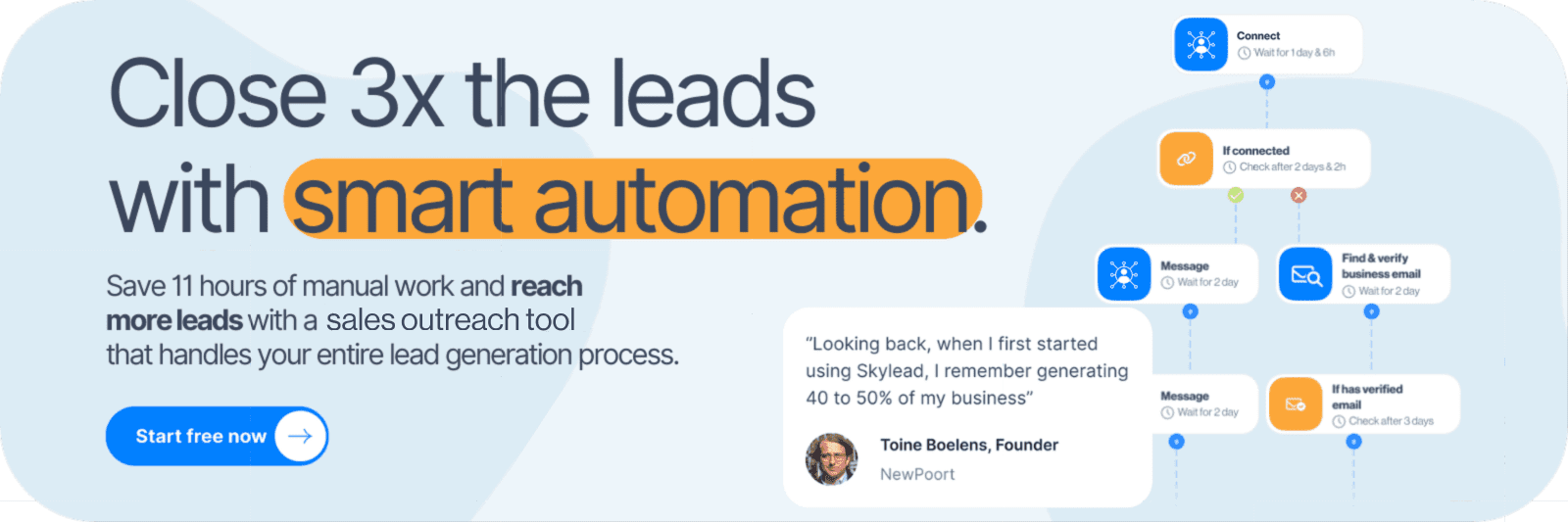
With Smart Sequences, you can combine LinkedIn actions and emails into the same campaign, with if/else conditions to act on your leads' behavior.
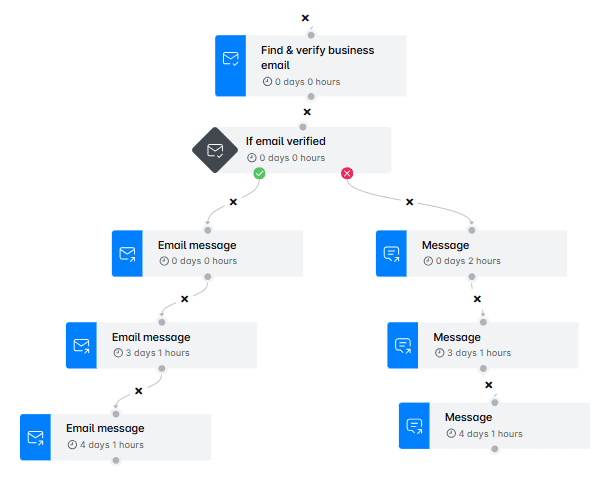
For example, consider a prospect who hasn't accepted your LinkedIn connection request.
Instead of manually deciding what to do, you can configure a sequence that sends an email when its conditions are met.
And if a prospect replies, your workflow can respond to that event rather than continuing every scheduled touch.
Skylead also supports:
- Unlimited connected email accounts, with a published allowance of 100,000 emails per month on the All-in-one plan.
- Email account rotation.
- Email warm-up.
- Email discovery and verification.
- A/B testing.
- Image and GIF personalization.
- A unified Smart Inbox.
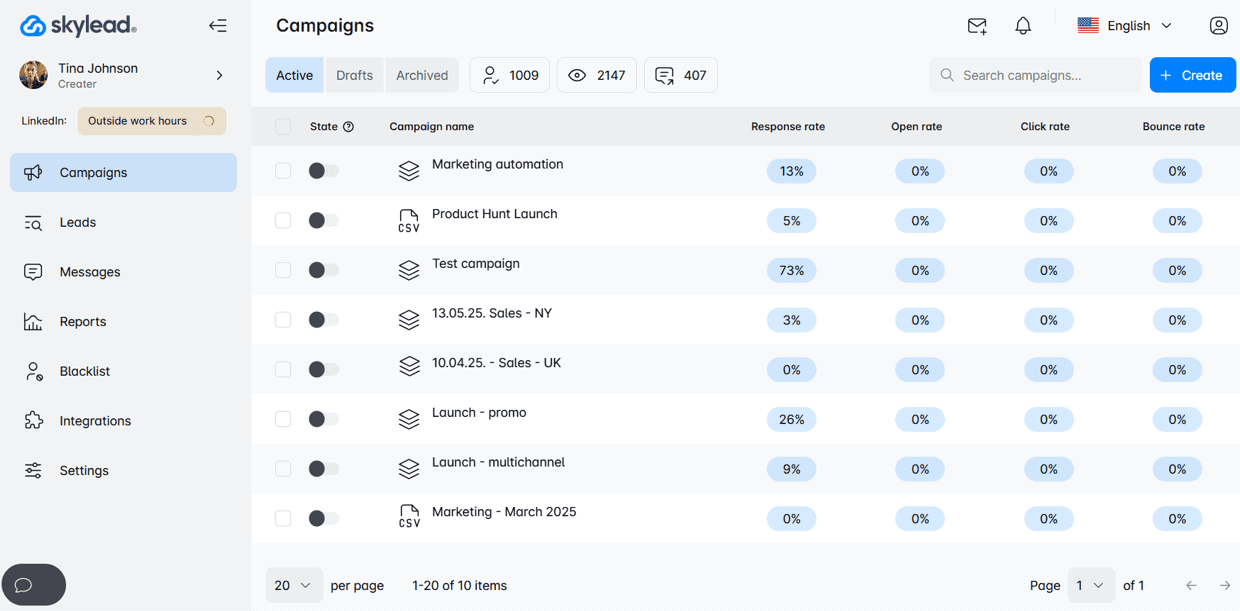
- Campaign analytics and reporting.
Unlimited connected mailboxes should not be confused with unlimited sending volume, and email warm-up does not guarantee inbox placement.
Compared with PhantomBuster: PhantomBuster offers flexible LinkedIn automation workflows, but Skylead provides a more directly integrated environment for building multichannel campaigns and managing replies.
AI SDR: Keep qualified conversations moving
Skylead's AI SDR can help manage conversations after prospects respond.
You can train it using information about your company, offerings, sales strategy, and goals.
It can then help qualify interested prospects, respond to common questions, and move suitable conversations toward meeting bookings.
Skylead offers automatic and semi-automatic operation, allowing you to choose how much human review is involved.
This is a separate capability from simply generating AI outreach messages.
Compared with Evaboot and PhantomBuster: Neither currently offers a comparable native, unified AI SDR conversation-management workflow in its publicly documented core product.
Agency features
If you manage prospecting and outreach for multiple clients, Skylead also provides an agency-oriented offering.
Depending on the agreement, agencies can access:
- Client and seat management through an agency dashboard.
- Centralized visibility into client conversations.
- Granular roles and permissions.
- Client performance and risk monitoring.
- Dedicated support arrangements.
- White-label options with custom branding and client-facing support.
These features are especially relevant to agencies looking to deliver outreach software under their own brand rather than simply supply prospect lists.
Skylead pros and cons
| Pros | Cons |
|---|---|
| Prospecting, enrichment, LinkedIn automation, and email outreach in one platform | Higher starting cost than extraction-only tools |
| Conditional Smart Sequences | A bit steep learning curve |
| Native LinkedIn and email workflow | More functionality than teams needing only occasional exports may require |
| Smart Inbox and AI SDR capabilities | |
| Agency dashboard, client management, and white-label options |
Skylead pricing
Skylead's All-in-one plan costs $100 per seat/month.
It includes core prospecting, LinkedIn automation, cold email features, Smart Sequences, email discovery and verification, warm-up, and access to the published email-sending allowance.
For agencies, Skylead also advertises promotional packages starting at $999/month for 25 seats and $1,999/month for unlimited seats during the first year, with white-label availability subject to agreement. See Skylead's pricing.
Our verdict: Choose Skylead when your goal is not just to get a list of contacts, but to manage more of the journey from targeting to outreach and qualified conversations in one place.
Want to see how your prospecting workflow could work in Skylead? Try Skylead free for 7 days.
2. Wiza - Best for LinkedIn contact data and AI research
Best for: SDRs and recruiters who primarily need verified contact information and better-qualified prospect lists.
Pricing: Free plan; paid individual plans start at $49 per user/month.
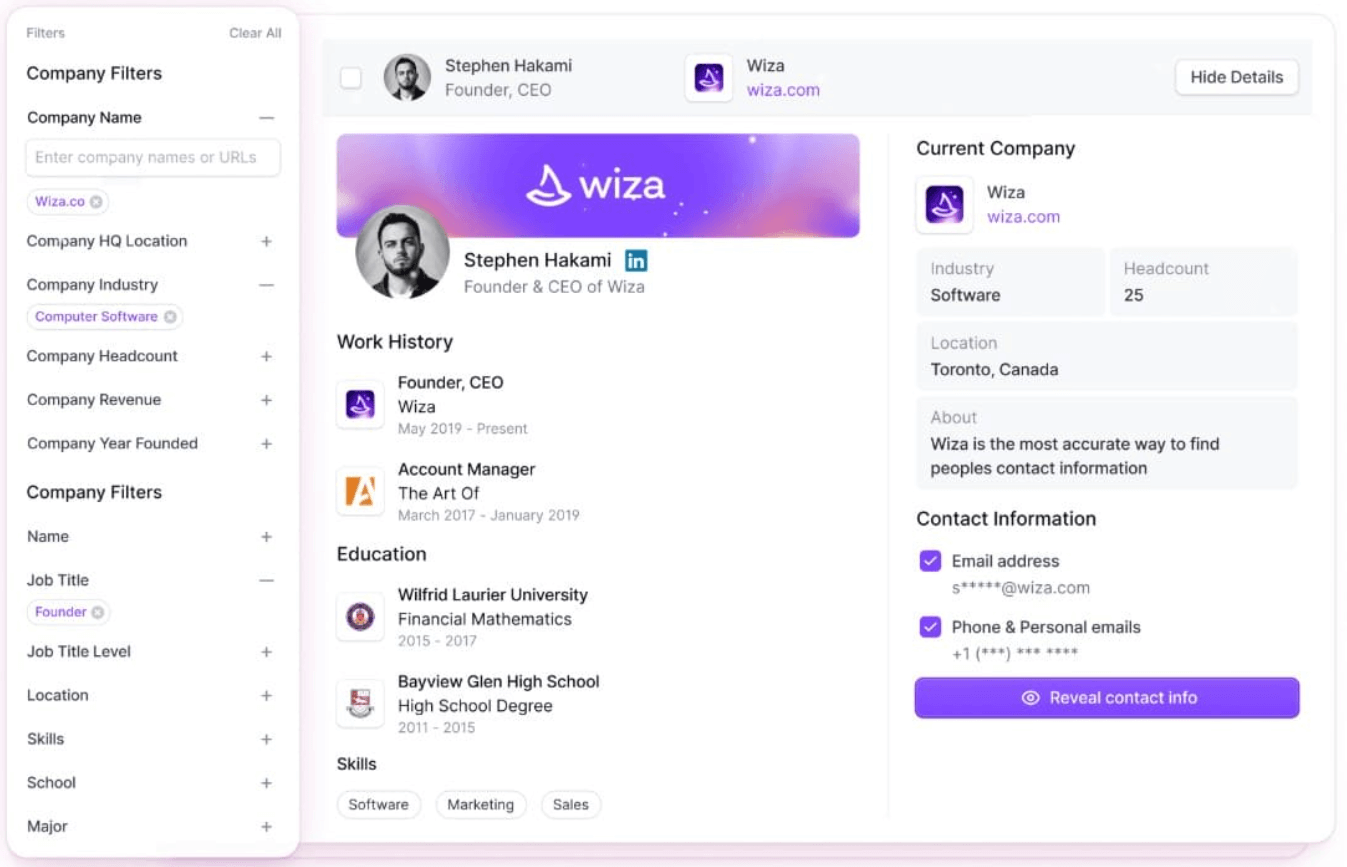
Wiza is a prospecting and contact enrichment platform focused on helping teams build usable lead lists.
Like Evaboot, it is particularly relevant to people who already use LinkedIn and Sales Navigator to identify their audience.
Prospecting
Wiza supports prospect discovery and extracting contact data from LinkedIn-based workflows.
It also offers Wiza Prospect, allowing teams to work with a broader prospecting dataset rather than only a manual Sales Navigator export process.
You can find contact information, export lists, and sync results into supported CRMs.
AI data enrichment
Wiza's AI Research is more than a basic email finder.
It can research companies and contacts using public web information and Wiza's data, then turn the findings into structured fields.
For example, you could use it to investigate whether a company serves enterprise customers, appears to use a particular technology, or is actively expanding its sales team.
You can filter contacts using those additional insights before exporting or transferring them to a CRM.
Wiza also provides email and phone-number enrichment.
Outreach
Wiza is strongest as a prospecting and data-preparation solution.
It supports moving enriched contacts into CRMs and other workflows, but it is not positioned around a native LinkedIn-plus-email Smart Sequence builder comparable to Skylead's.
If multichannel outreach is your primary goal, assess the additional software you would need.
AI SDR
Wiza offers AI research for improving lead selection like Skylead has, but its AI Research feature is not equivalent to a native AI SDR that manages ongoing sales conversations and books meetings.
Wiza pros and cons
| Pros | Cons |
|---|---|
| Strong LinkedIn-oriented contact discovery | End-to-end multichannel outreach is not its main offering |
| AI Research for company and prospect qualification | Data access and exports depend on plan allowances |
| Verified email and phone-number features | Additional tools may be needed for reply management and AI SDR |
| CRM integrations and list exports | LinkedIn-dependent collection workflows require platform-risk review |
Wiza pricing
Wiza advertises:
- Free: 20 valid emails and 5 phone numbers.
- Starter: $49/user/month with 100 valid emails and 100 phone numbers monthly.
- Email: $99/user/month with 500 valid emails monthly.
- Email + Phone: $199/user/month with 500 valid emails and 500 phone numbers monthly.
- Team: Custom pricing, with different enterprise allowances.
Annual billing options are also available.
See Wiza pricing.
Our verdict: Wiza is a useful Evaboot alternative when verified contact data and AI-assisted qualification matter more than running your outreach in the same platform.
3. Emelia - Best for combining prospecting and multichannel outreach
Best for: Sales teams and agencies that want to combine LinkedIn and cold email campaigns with enrichment and AI-generated replies.
Pricing: Starts at €37/month.
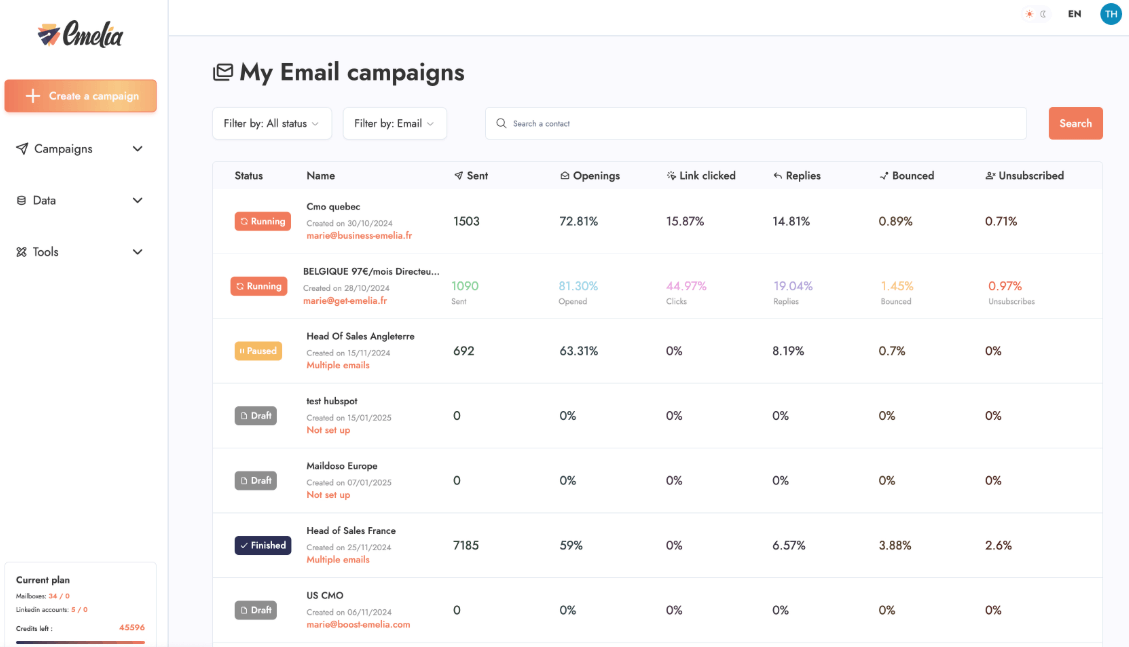
Emelia offers cold email, LinkedIn automation, lead sourcing, email warm-up, and AI features within a multichannel prospecting platform.
It's closer to Skylead's sales engagement category than to Evaboot's specialist data-export category.
Prospecting
Emelia supports importing prospects from LinkedIn Sales Navigator, search results, and CSV lists.
Its scraping and list-management features allow users to collect leads and prepare them for outreach.
The number of connected LinkedIn accounts varies by plan.
AI data enrichment
Emelia provides email finding, email verification, phone discovery, and AI enrichment functions.
Its Magic Writer feature also helps generate personalized sales copy.
These functions use enrichment credits, so teams should separate their cost of collecting data from their outreach subscription.
Outreach
Emelia supports multichannel campaigns with LinkedIn and email actions.
Its public pricing comparison also lists conditional or smart steps, A/B testing, a unified inbox, mailbox rotation, and email warm-up.
That makes it a genuine competitor for sales teams looking beyond Evaboot.
Compared with Skylead: Both cover LinkedIn and email automation. The best choice depends on your sequencing requirements, account allowances, enrichment workflows, and whether you also need advanced agency management or Skylead's account-based and signal-based prospecting.
AI SDR
Emelia offers Magic Reply and Auto Magic Reply.
Magic Reply can suggest responses based on previous conversations and writing style. Auto Magic Reply is designed to respond automatically, follow up, and help arrange appointments.
This goes beyond simple AI copywriting.
Emelia pros and cons
| Pros | Cons |
|---|---|
| LinkedIn and email campaigns in one platform | LinkedIn account allowances vary by plan |
| Email, phone, and AI enrichment | Extra enrichment credits may increase costs |
| Smart steps and unified inbox | Advanced configurations may require a higher tier |
| AI-assisted and automated replies | Fit depends on the specific reply and qualification workflow needed |
Emelia pricing
Emelia's public monthly pricing includes:
- Start: €37/month — up to 3 mailboxes, 1 LinkedIn account, and 500 included enrichment credits.
- Grow: €97/month — up to 50 mailboxes, 3 LinkedIn accounts, and 1,000 included credits.
- Scale: €297/month — unlimited mailboxes, up to 10 LinkedIn accounts, and 5,000 included credits.
Additional LinkedIn accounts and enrichment credits can be purchased under its published terms.
Emelia also advertises a 7-day free trial.
See Emelia pricing.
Our verdict: Emelia is worth considering if you want multichannel outreach rather than only Sales Navigator lead extraction. Compare its account and credit allowances with Skylead's broader prospecting, AI SDR, and agency features.

4. Bardeen — Best for customizable prospecting and data workflows
Best for: RevOps and growth teams that want to automate research, extraction, qualification, and data transfers across multiple tools.
Pricing: From $10/month for its Basic plan.
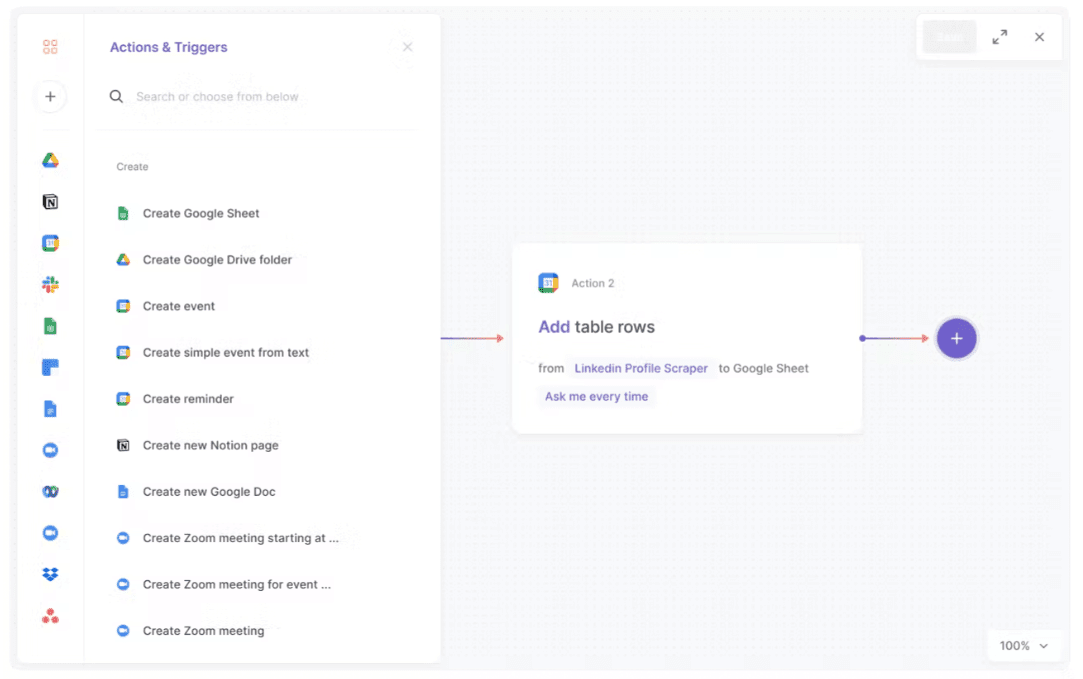
Bardeen is a workflow automation platform that helps teams automate repetitive browser and data tasks.
Unlike Evaboot, which focuses on Sales Navigator data exports, Bardeen can support workflows across different websites and applications.
Prospecting
Bardeen allows users to build web scraping and data extraction workflows.
For example, a workflow can collect search results, extract profile information, and write the data to a spreadsheet.
Teams can build their own automations or use available templates rather than rely on one fixed export process.
AI data enrichment
Bardeen can combine scraping with data enrichment and AI-based qualification.
You might extract prospect data, validate available contact information, ask AI to classify the record against your ICP, and transfer qualified results to another system.
This is particularly useful if your team has custom prospecting requirements that don't fit a standard tool.
Outreach
Bardeen can connect prospecting workflows to sales and CRM applications.
However, its core value is automating tasks across tools rather than replacing a dedicated LinkedIn and email sales engagement platform with a unified conversation inbox.
Compared with Skylead: Bardeen gives users flexibility to build their own data workflows. Skylead offers a more purpose-built path from prospecting and enrichment to outreach and reply management.
AI SDR
Bardeen provides AI-powered workflow and qualification capabilities.
A directly comparable native AI SDR that independently manages LinkedIn and email conversations was not established in the reviewed product offering.
Bardeen pros and cons
| Pros | Cons |
|---|---|
| Flexible web scraping and research automations | Custom workflows may take time to configure |
| AI-assisted enrichment and lead qualification | Not primarily a native multichannel outreach platform |
| Works across multiple applications | Credit costs depend on the steps and rows processed |
| Useful for custom RevOps processes | Not ideal if you only want a ready-to-use sales sequence builder |
Bardeen pricing
Bardeen's current public pricing advertises:
- Basic: From $10/month, with 100 credits/month shown at the entry configuration.
- Premium: From $50/month, with 1,000 credits/month shown at the entry configuration.
- Enterprise: Custom pricing.
The pricing page also explains that credit consumption varies by action, with scraping, AI actions, and enrichment potentially consuming different amounts.
See Bardeen pricing.
Our verdict: Choose Bardeen if you want customizable automation for collecting, qualifying, and routing data. If you want native LinkedIn and email outreach with integrated reply management, Skylead is more directly aligned with that requir
5. Skrapp — Best for finding and enriching business emails
Best for: Recruiters, SDRs, and B2B teams that need professional email addresses and prospect list enrichment.
Pricing: Free plan; Professional starts at $39/month, or $29/month billed annually.
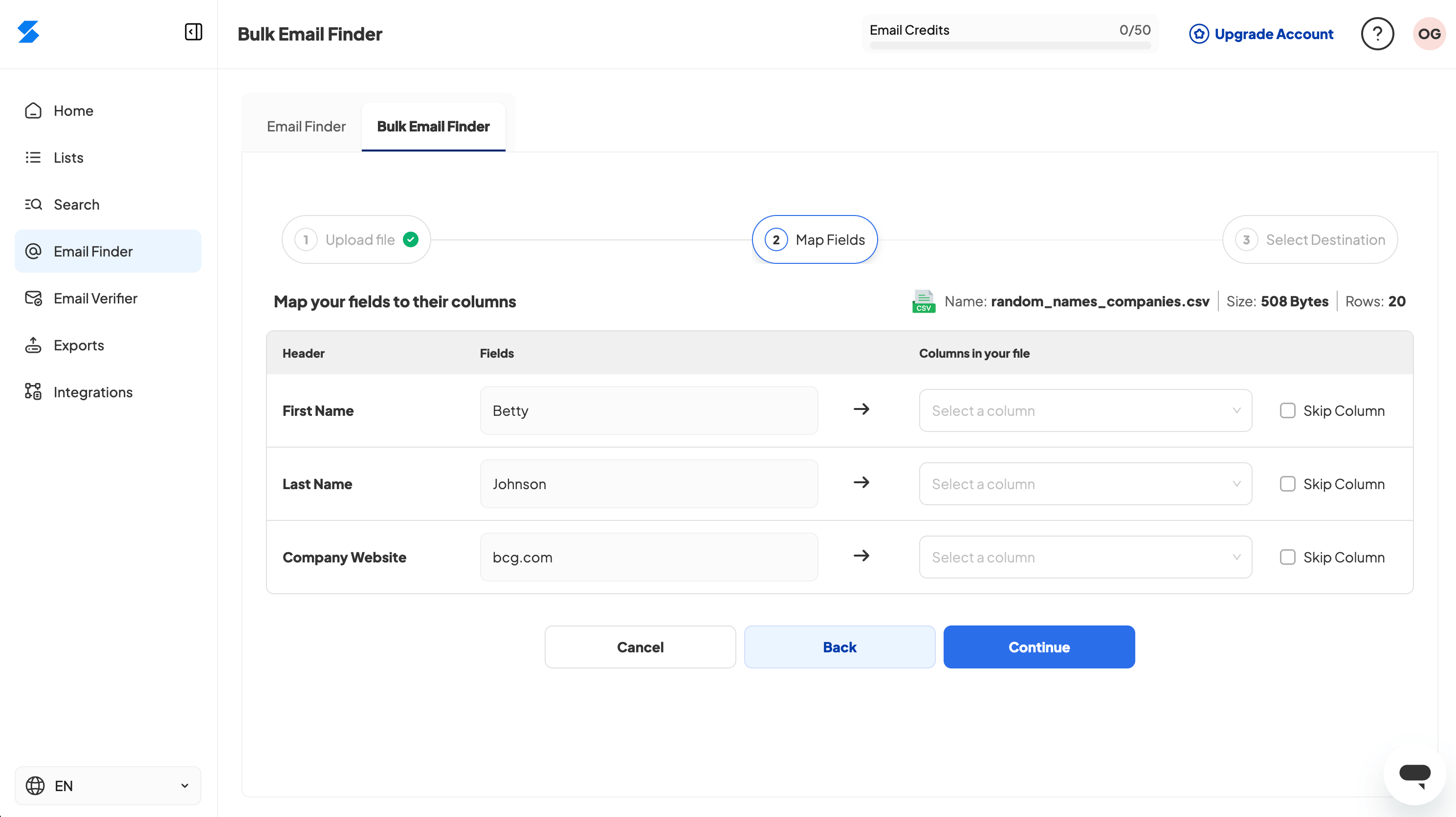
Skrapp is a business email finder and lead enrichment platform.
Like Evaboot, it is most relevant when your immediate need is turning prospect information into a usable contact list.
Prospecting
Skrapp supports prospecting through LinkedIn, Sales Navigator, LinkedIn Recruiter, company websites, and its email-search functionality.
You can find business emails, verify contact information, and save or export lists.
Paid plans also list Sales Navigator list-saving and multi-page enrichment capabilities.
AI data enrichment
Skrapp has expanded beyond basic email discovery.
Its Professional and Enterprise pricing tiers now list AI Enrichment, in addition to email verification and LinkedIn-based enrichment.
That makes the older description of Skrapp as a tool with only basic company enrichment too limited.
However, AI enrichment features should not automatically be treated as equivalent to a customizable multi-provider enrichment workflow with conditional actions.
Outreach
Skrapp's current feature list includes an Auto-Connect capability for LinkedIn profiles.
That is worth distinguishing from a fully integrated sales engagement platform: its public feature list does not establish a native multichannel sequence builder, unified LinkedIn/email reply management, or equivalent conditional outreach features.
AI SDR
Skrapp's published AI Enrichment capability is not a dedicated AI SDR for managing prospect replies and booking meetings.
Skrapp pros and cons
| Pros | Cons |
|---|---|
| Multiple ways to find and verify business emails | Outreach capabilities are narrower than those of a dedicated sales engagement platform |
| LinkedIn, Sales Navigator, and Recruiter support | Volume depends on available credits |
| AI Enrichment on paid plans | Does not offer a documented full AI SDR workflow |
| Shared credits and CRM-related features | Browser-based LinkedIn collection should be assessed against platform rules |
Skrapp pricing
Skrapp advertises:
- Free: 50 email credits.
- Professional: $39/month on monthly billing, or $29/month billed annually, with 2,000 credits and 2 users at the displayed configuration.
- Enterprise: From $349/month, or $262/month billed annually, with 50,000 credits and 15 users at the displayed configuration.
Additional volume options are available.
See Skrapp pricing.
Our verdict: Skrapp is suitable when verified emails and enrichment are your immediate priorities. Skylead is the more relevant option when those contacts need to move into ongoing LinkedIn and ema
6. LeadLoft — Best for sales engagement, CRM, and AI SDR
Best for: Startups and smaller sales teams that want prospecting, outreach, and pipeline management together.
Pricing: From $99/user/month.
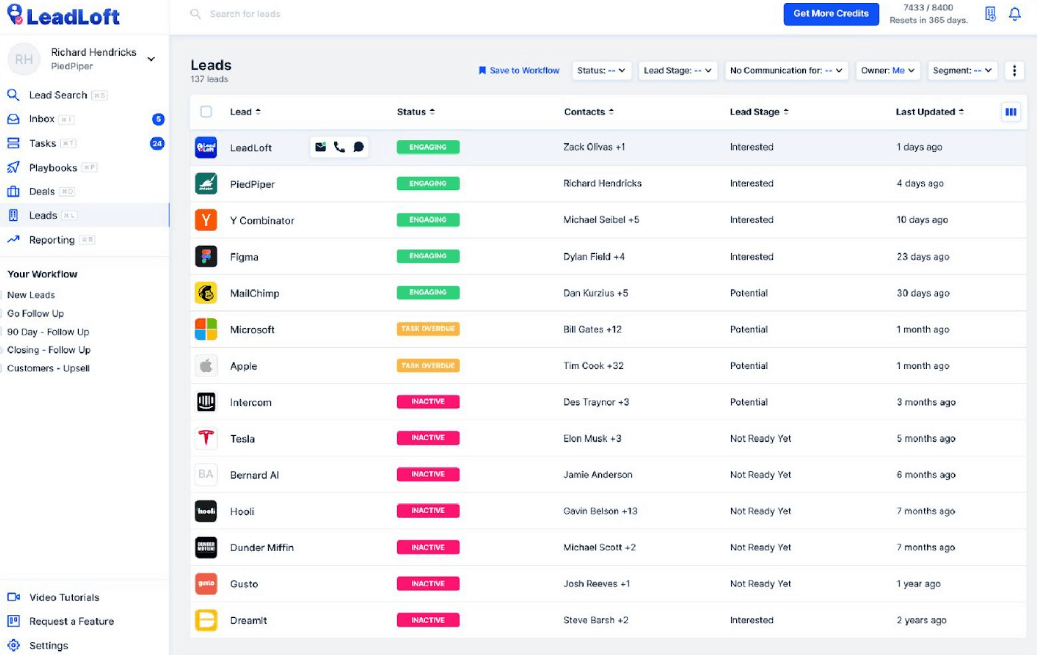
LeadLoft brings prospecting, sales engagement, and CRM functions into one platform.
That makes it different from Evaboot, which primarily helps users prepare contact data.
Prospecting
LeadLoft offers database access, a LinkedIn extension, email finding, and list enrichment.
Users can collect contact data, organize prospects, and manage them inside its sales environment.
AI data enrichment
LeadLoft provides contact enrichment and AI-assisted prospecting.
Its higher-tier features include an AI Prospector that can help generate targeted prospect lists from natural-language instructions.
It also offers AI writing, playbook building, and deal-routing capabilities.
Outreach
LeadLoft supports both LinkedIn and email automation. However, using LinkedIn in prospecting or outreach requires Chrome extension which makes this tool not the safest on the market, like some other cloud-based solutions.
It also includes CRM and deal-pipeline features, allowing teams to keep prospect records, conversations, and opportunities together.
Compared with Skylead: LeadLoft has a stronger native CRM emphasis. Skylead provides a broader selection of dedicated outbound features, including account-based prospecting, Post Signals, Smart Sequences, and agency white-label options.
AI SDR
LeadLoft introduced AI SDR Agents that can respond to prospects, answer questions, qualify interest, follow up, and coordinate meetings. It also supports for conversations across LinkedIn and email.
The important buying distinction is which AI features are included in each plan and how much control users have over the conversation workflow.
LeadLoft pros and cons
| Pros | Cons |
|---|---|
| Combines prospecting, outreach, and CRM | More expensive than specialist extraction tools |
| LinkedIn and email automation | Advanced AI SDR features are associated with the higher-priced tier |
| Native deal-pipeline functionality | Seat-based pricing may increase with team size |
| AI SDR for qualification and meeting scheduling | Not primarily focused on Evaboot-style CSV extraction and cleaning |
LeadLoft pricing
LeadLoft lists:
- Unlimited: $99/user/month, including its core sales automation and prospecting features.
- Scale AI: A promotional $299/user/month displayed against a $400 reference price, adding AI SDRs, AI Prospector, AI writing, and other AI features.
- Managed Service: Pricing on request.
LeadLoft advertises a 7-day trial.
See LeadLoft pricing.
Our verdict: LeadLoft is a credible option if you want sales engagement, CRM, and AI-assisted conversations together, however features are limited. Compare it directly with Skylead if your priority is an integrated outbound workflow rather than only contact extraction.
7. PhantomBuster — Best for flexible data extraction and automation
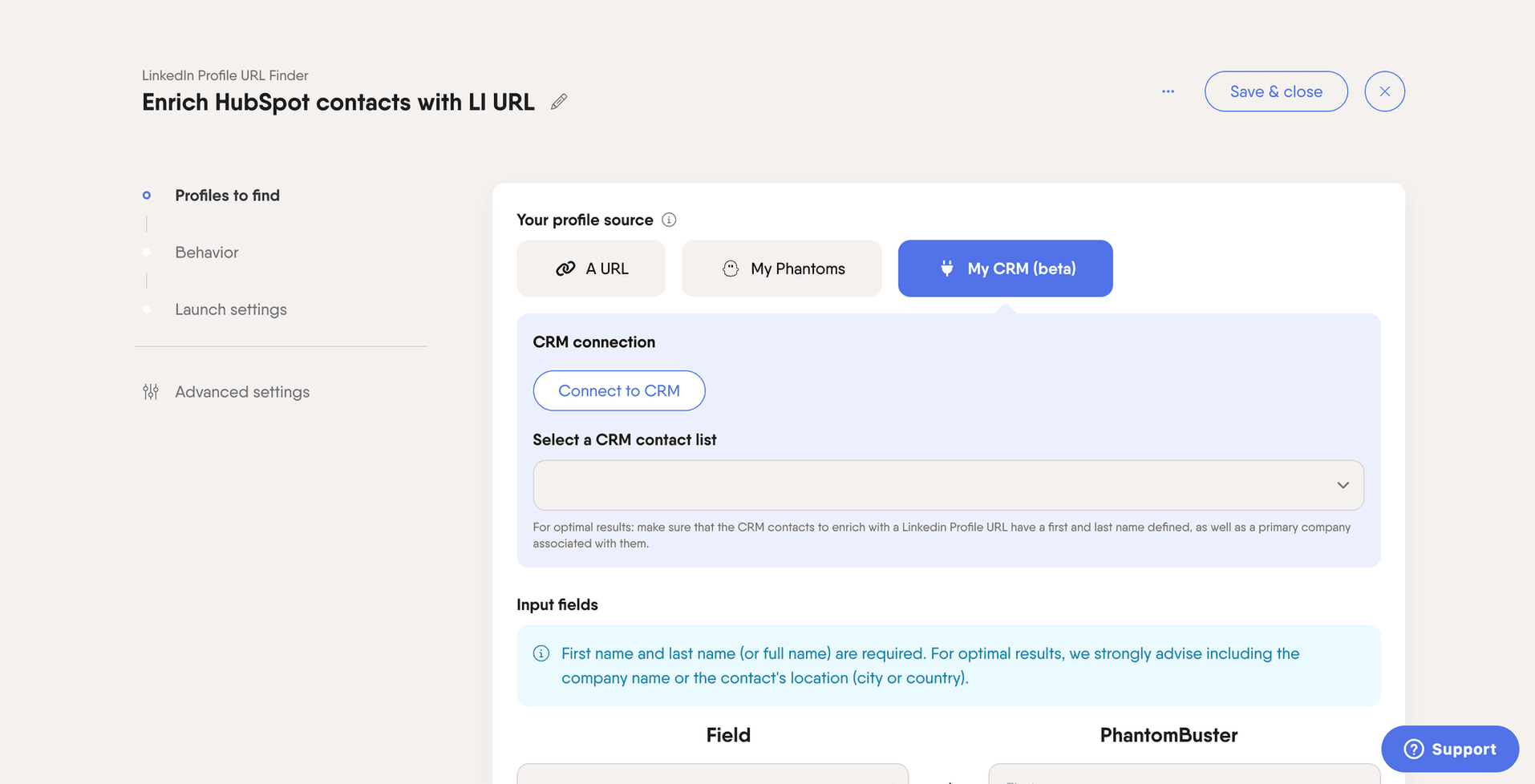
Best for: Growth teams, RevOps specialists, and prospectors who want to automate data extraction, enrichment, and actions across multiple platforms.
Pricing: From $56/month billed annually on the public USD pricing page.
PhantomBuster is a cloud-based automation platform built around individual automations and connected workflows.
Its strength is flexibility: it can automate data collection and tasks across LinkedIn and several other platforms.
However, its operating model differs from a purpose-built sales engagement platform.
We also explored its workflows directly, which helped us identify the practical differences.
Prospecting: Flexible, but workflow-driven
PhantomBuster offers prebuilt automations for collecting prospect and activity data.
For LinkedIn, these include workflows for:
- Extracting Sales Navigator search results.
- Collecting LinkedIn profile and company information.
- Finding people who commented on or engaged with posts.
- Gathering followers and related profile data.
- Researching prospects with AI-assisted tools.
It also supports data collection from other platforms, including Instagram, X, Facebook, Reddit, and YouTube.
This is useful if your prospecting workflow involves multiple sources.
For example, you might collect people who engaged with a LinkedIn post, enrich their information, and transfer them into another workflow.
What we noticed during testing
PhantomBuster relies heavily on separate automations, often called Phantoms, which can be connected into broader workflows.
This provides customization, but can require additional configuration when your process involves several prospecting and outreach steps.
It also uses a browser extension for connecting LinkedIn sessions to PhantomBuster.
Using unauthorized tools to scrape or automate LinkedIn activity carries account-restriction risk. That risk cannot be reduced to a simple claim that cloud tools are safe and extensions are unsafe.
Compared with Skylead: PhantomBuster can gather data across more types of websites. Skylead provides account-based prospecting, a B2B Database, data enrichment for 20+ signals, and Post Signals tied more directly to a B2B outreach process.
AI data enrichment: LinkedIn data plus external providers
PhantomBuster can collect available LinkedIn profile and company information and structure it for further processing.
It also offers AI-assisted prospect research and message generation.
For finding professional email addresses, PhantomBuster integrates with BetterContact's waterfall enrichment services.
Waterfall enrichment searches multiple data providers in sequence to improve contact discovery coverage.
PhantomBuster also supports integrations with services such as Hunter, Dropcontact, and Snov.io, including bringing your own provider account where supported.
It's also important to check credit consumption rather than judging the price only by the number of emails successfully returned.
PhantomBuster's documentation explains that its included email-discovery credits can be consumed per lookup attempt, even when no email is found.
Compared with Skylead: PhantomBuster offers a configurable combination of LinkedIn data collection and external enrichment providers. Skylead's AI data enrichment is more directly connected to prospect records and subsequent multichannel campaigns.
Outreach: Powerful automations, but a different structure
PhantomBuster supports LinkedIn actions such as connection requests, message sending, and outreach flows.
It also offers AI LinkedIn Message Writer and AI LinkedIn Post Responder workflows.
For example, the AI Post Responder can evaluate a lead's recent LinkedIn posts and generate a relevant comment or message.
PhantomBuster also supports connecting automations and using AI tools or its MCP server to orchestrate workflows.
What we noticed during testing
Using external AI tooling to coordinate LinkedIn outreach required additional configuration.
That setup was more involved than using a dedicated visual campaign builder.
PhantomBuster can run linked and conditional LinkedIn workflows, however they are simple, and require Chrome extension, which is not a safe option.
The key difference is that it doesn't provide the same native, cloud-based and unified LinkedIn-plus-cold-email Smart Sequence and Smart Inbox experience as Skylead.
You may also need to account for AI credits, execution time, and any third-party tools used alongside the PhantomBuster subscription.
AI SDR: Automation is not the same as conversation management
PhantomBuster offers AI-assisted prospecting and content-generation capabilities.
However, we did not establish a native AI SDR with the same integrated LinkedIn/email inbox, configurable prospect-response handling, qualification, and meeting-booking workflow offered by dedicated AI SDR platforms.
Its AI message generation and post-response features should not be confused with full conversational AI SDR functionality.
Compared with Skylead: Skylead's AI SDR can work with incoming conversations, whereas PhantomBuster is primarily designed to execute data and automation workflows.
PhantomBuster for agencies
PhantomBuster supports multiple users, automation workflows, and integrations, including CRM connections with HubSpot, Salesforce, and Pipedrive.
These are useful capabilities for agencies managing prospecting operations.
However, we could not establish a comparable native white-label SaaS offering with client branding, client dashboards, granular permissions, and branded support.
Compared with Skylead: Skylead is more directly positioned for agencies that want to manage outreach clients under one platform and potentially offer a white-labeled experience.
PhantomBuster pros and cons
| Pros | Cons |
|---|---|
| Automation across LinkedIn and multiple other platforms | More setup when several workflows need to work together |
| Extensive data extraction and prospecting options | Not the same native multichannel outreach experience as a dedicated sales engagement platform |
| AI-assisted workflows and external enrichment integrations | Execution time, AI credits, and enrichment credits affect total cost |
| MCP server and CRM integrations | No comparable native, integrated AI SDR workflow established |
| Flexible workflows for technical teams | LinkedIn automation and scraping can create account-policy risks |
PhantomBuster pricing
PhantomBuster's current public USD pricing page lists the following annual-billing rates:
| Plan | Price | Automation slots | Execution time | Email credits | AI credits |
|---|---|---|---|---|---|
| Trial | Free | 5 | 2 hours | 50 | 1,000 |
| Start | $56/month | 5 | 20 hours/month | 500/month | 10,000/month |
| Grow | $128/month | 15 | 80 hours/month | 2,500/month | 30,000/month |
| Scale | $352/month | 50 | 300 hours/month | 10,000/month | 90,000/month |
The trial also limits exports to 10 rows. Plans include the MCP server, while paid plans have higher extraction and workflow allowances.
Prices may be displayed in different currencies and at different rates depending on billing selection and region.
Our verdict: PhantomBuster is a strong choice if you want to assemble flexible scraping, enrichment, and LinkedIn automation workflows across multiple sources.
If your team wants prospecting, conditional LinkedIn and email outreach, unified reply management, and an AI SDR within a purpose-built sales platform, Skylead is worth considering instead.
8. GetProspect — Best for B2B data enrichment and cold email
Best for: Teams that want verified B2B contacts, list enrichment, and email-focused outbound campaigns.
Pricing: Free plan; paid plans start at $49/month.
GetProspect is a B2B email-finding and prospecting platform.
It offers a contact database, LinkedIn-related prospecting, contact enrichment, email verification, and cold email functionality.
That last capability matters: GetProspect is not just a data-export tool.
Prospecting
GetProspect lets users search for leads using filters such as industry, company size, location, and job title.
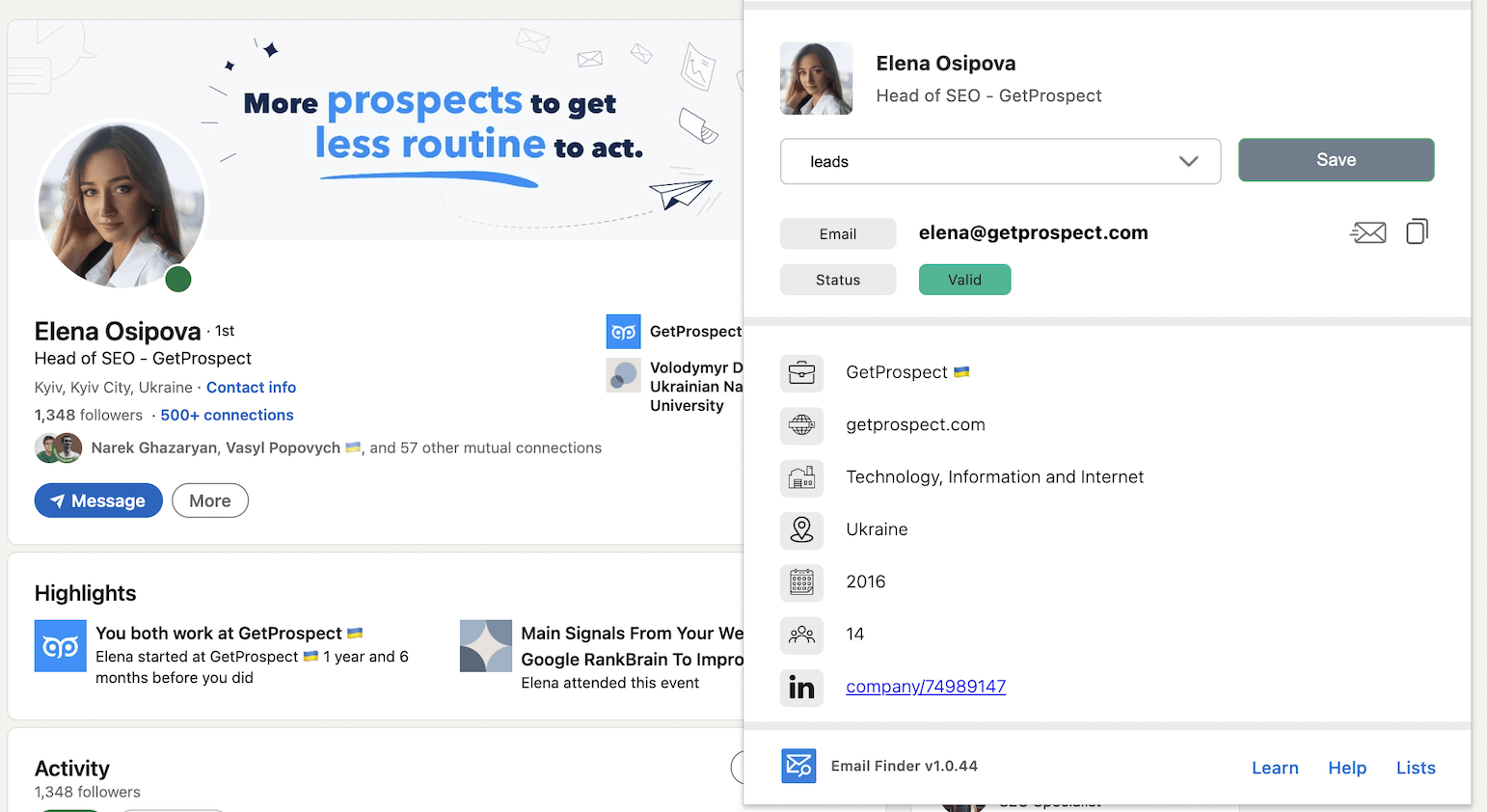
It also offers a LinkedIn email-finder extension and bulk contact enrichment.
You can upload CSV files, find professional email addresses, verify records, and transfer contacts into a CRM.
AI data enrichment
GetProspect provides contact and company enrichment, including email verification and available phone information.
Its data enrichment is helpful for preparing outreach lists.
However, we did not establish an equivalent customizable AI research environment or AI SDR workflow from the reviewed product documentation.
For teams that need advanced company research or signal-based personalization, this distinction may matter.
Outreach
GetProspect supports native cold email sequences.
You can create personalized messages, automate follow-ups, adjust sending schedules, and track campaign results.
It also offers A/B testing and CRM-related integrations.
Compared with Skylead: GetProspect's outreach is primarily email-focused. Skylead combines LinkedIn and email actions inside Smart Sequences, alongside a unified reply-management workflow.
AI SDR
GetProspect's cold email automation should not be confused with a dedicated AI SDR.
Its documented capabilities do not establish an autonomous agent for handling ongoing LinkedIn and email conversations and qualifying prospects toward meetings.
GetProspect pros and cons
| Pros | Cons |
|---|---|
| B2B database and contact discovery | Not primarily designed for unified LinkedIn and email automation |
| Verified email discovery and CSV enrichment | No dedicated AI SDR established |
| Native cold email sequences and follow-ups | Advanced signal research and AI enrichment are not its primary positioning |
| Free entry plan and scalable contact credits | Contact data and sending allowances must be evaluated separately |
GetProspect pricing
GetProspect advertises:
- Free: 50 valid emails and 100 email verifications.
- Starter: $49/month, including 1,000 valid emails, 2,000 verifications, and 5 phone numbers.
- Growth: From $99/month, including 5,000 valid emails and 10,000 verifications at the entry Growth configuration.
- Higher-volume options: Available at additional prices.
Its cold email functionality has separate sending limits and usage considerations. For example, its pricing FAQ refers to free-tier email sequences and larger sending allowances on paid configurations.
Our verdict: GetProspect is a good fit when B2B data collection and email outreach are the priorities. If LinkedIn automation, branching between communication channels, and AI-assisted conversation handling are essential, Skylead is the broader alternative.
How to choose the right Evaboot alternative
The best tool isn't necessarily the one with the most features.
It's the one that handles the work your team actually needs to get done.
Here are the questions we'd ask before choosing.
1. Do you need lead extraction or an entire outreach workflow?
If you mainly export Sales Navigator leads and send them elsewhere, start by comparing Evaboot, Wiza, Skrapp, and PhantomBuster.
If your goal is to discover prospects, enrich their data, contact them, and manage replies, compare Skylead, Emelia, and LeadLoft.
A specialist scraper can be more economical than an all-in-one platform when contact extraction is your only requirement.
2. Do you need LinkedIn outreach, cold email, or both?
This distinction matters more than it might seem.
Some tools help you find leads but don't provide a complete native outreach workflow.
Others support email sequences without offering the same level of LinkedIn automation.
If your sales process requires both channels, evaluate whether they operate inside one sequence or need separate tools.
For more options, see our comparison of LinkedIn automation tools.
3. How much enrichment do you actually need?
Not all data enrichment is the same.
Basic enrichment may mean finding a business email or phone number.
More advanced enrichment may involve researching company funding, technology usage, business context, hiring activity, or other relevant attributes.
Before choosing, check whether enrichment data can flow into your outreach automatically or whether it needs to be exported and imported again.
You may also want to compare your options against the broader category of B2B prospecting tools.
4. Do you need AI to research prospects or manage conversations?
AI research, AI message writing, and AI SDR capabilities solve different problems.
AI research helps you understand who to target.
AI writing helps you produce messages.
An AI SDR can assist with conversations after a lead responds, potentially including qualification, objection handling, follow-ups, and meeting scheduling.
If conversation handling is your priority, compare the AI SDR features of Skylead and LeadLoft, and examine Emelia's automated reply capabilities.
5. What is the total cost of your workflow?
Don't compare only the lowest subscription prices.
Your actual monthly cost may include:
- Sales Navigator subscriptions.
- Lead export or scraping credits.
- Email discovery and verification credits.
- AI research or enrichment credits.
- LinkedIn account or user-seat charges.
- Email outreach software.
- AI SDR features.
- CRM or integration costs.
For example, Evaboot's subscription may be sufficient if you only need exports.
But if you also subscribe to several tools for enrichment, outreach, and reply management, an integrated platform may become more attractive.
On the other hand, a $100-per-seat sales engagement subscription doesn't make sense for everyone who occasionally needs a CSV file.
Consider the cost per usable prospect and the complete workflow—not just the price per credit.
6. Are you managing outreach for clients?
Agencies often need capabilities that individual SDRs don't.
These may include separate client access, reporting, permissions, branded interfaces, support arrangements, and centralized campaign management.
If your business involves selling managed outreach services or white-labeled software, evaluate those requirements before choosing a product.
You can read more about Skylead for agencies.
Which Evaboot alternative should you choose?
Here's our final recommendation based on your primary use case:
| Your main priority | Tools to consider first |
|---|---|
| Prospecting, AI data enrichment, outreach and AI SDR in one workflow | Skylead |
| Finding and verifying B2B emails | Wiza, Skrapp, GetProspect |
| Custom scraping and connected automation workflows | PhantomBuster, Bardeen |
| Combining LinkedIn and email outreach | Skylead, Emelia, LeadLoft |
| AI-assisted replies and conversation management | Skylead, LeadLoft, Emelia |
| Exporting and cleaning Sales Navigator data | Evaboot, Wiza |
There isn't one perfect replacement for every Evaboot user.
If you need only clean prospect exports, a focused data tool may be all you need.
But if your goal is to find qualified prospects, enrich their information, reach out through LinkedIn and email, and keep conversations moving toward meetings, it's worth considering a broader platform.
That's where Skylead comes in.
With account-based prospecting, a B2B Database, Post Signals, AI data enrichment, Smart Sequences, and AI SDR capabilities, Skylead is designed to connect more of your sales process in one place.
And you don't have to commit to a paid subscription to explore the workflow.
Start your 7-day Skylead free trial and see whether it fits your outbound process.