Pipedrive vs HubSpot: Which CRM is better for your sales team?
Say your sales rep starts Monday with 15 open opportunities.
Three prospects need follow-ups. Two demos are scheduled this week. A proposal has been sitting unanswered since Thursday. Marketing has also handed over four new leads.
Both Pipedrive and HubSpot can hold all of that information.
What changes is how the rep works through it.
In Pipedrive, the pipeline stays front and center. Deals, activities, stalled opportunities, emails, and next steps are closely tied together.
In HubSpot, the rep has a wider workspace. Deals and tasks sit alongside leads, sequences, meetings, contact activity, and the customer history collected across HubSpot.
That difference matters more than comparing 50 features.
This Pipedrive vs HubSpot comparison looks at what your team will actually see, click, automate, and manage inside each CRM, then helps you decide which is the best CRM for sales based on your workflow.
Pipedrive vs HubSpot at a glance
| Feature | Pipedrive | HubSpot |
| Best for | Sales-focused teams | Sales teams connected closely with marketing and customer data |
| Main workspace | Pipeline, Leads, Activities, Mail, Pulse | Sales Workspace, CRM records, deals, tasks, leads, sequences |
| Pipeline management | Visual drag-and-drop deal pipeline | Deal pipelines inside the broader CRM |
| Lead management | Leads Inbox and Pulse | Leads and prospecting inside the Sales Workspace |
| Full sync and tracking from Growth | Email, templates, tracking, and sequences depending on the plan | |
| Sequences | Growth and higher | Professional and Enterprise |
| Automation | Sales-focused trigger/action automations | Broader CRM workflows |
| Prospecting | Lead Booster, Prospector, scoring, and enrichment on higher tiers | Prospecting tools, CRM data, and AI features |
| Marketing context | More dependent on add-ons/integrations | Strong when HubSpot's wider platform is in use |
| Reporting | Sales dashboards, forecasts, and activity reports | Sales analytics plus wider CRM reporting |
| Integrations | 500+ | Larger HubSpot ecosystem |
| Free option | 14-day trial | Free tools available |
| Starting price | $14/seat/month billed annually | Starter list price: $20/month per Core Seat |
HubSpot: A wider sales workspace around the customer

HubSpot is built around a central CRM, with Sales Hub adding the tools reps use for prospecting, follow-ups, pipeline management, and closing.
Once you are inside the product, the experience is broader than simply opening a deal board.
For professional and enterprise users, much of the daily work can happen inside Sales Workspace.
The summary view can bring together tasks, leads, meetings, deal activity, and suggested actions. Reps can move into tasks to work a queue, prospects to manage leads, or deals to work active opportunities.
Open a contact, company, or deal, and HubSpot gives you a deeper CRM record containing properties, activity history, associated records, emails, meetings, and other customer information available in your setup.
Sequences are managed separately for repeatable sales follow-ups, while workflows sit behind the CRM and automate broader record-based processes.
The working path often looks something like this:
Sales Workspace → Tasks/Leads → CRM Record → Deal → Sequence/Workflow → Reporting
Where HubSpot wins
- One working area for sales activity: Sales Workspace can bring tasks, leads, deals, sequence activity, and other sales work into a single environment.
- Richer CRM records: Contacts, companies, deals, activity history, and associated information can live around the same record.
- Better when several teams use HubSpot: Marketing and other customer-facing activity can add context around what sales sees.
- Sequences for structured follow-up: Professional and Enterprise users can combine timed emails with manual sales tasks.
- Broader automation: Workflows can operate across CRM records and processes rather than staying focused only on deals.
- Room to expand: HubSpot can grow beyond Sales Hub into marketing, service, content, data, and other areas.
HubSpot describes Smart CRM as the system of record, while Sales Hub provides the prospecting, pipeline, and productivity tools reps and managers work in day-to-day.
Where HubSpot falls short
The useful sales functionality gets expensive quickly. Starter is relatively inexpensive, but Professional's standard price is $100 per Sales Seat/month.
Professional also carries a required one-time $1,500 onboarding fee, while Enterprise carries a $3,500 onboarding fee.
There is more platform to manage. Sales Workspace may make daily rep work simpler, but somebody still needs to configure properties, pipelines, workflows, permissions, lifecycle stages, and the wider CRM setup.
Smaller sales-only teams may not use the full value. If the team mainly wants a pipeline, email sync, next activities, and sales reports, HubSpot can be more than enough.
Best fit: HubSpot makes sense when sales needs more than a deal board and several teams benefit from working around the same customer data.
Pipedrive: A sales workflow built around deals and activities

Pipedrive takes a more contained approach.
Once logged in, the main areas are easy to understand:
Leads → Deals → Activities → Mail → Insights
Its newer Pulse functionality adds another prioritization layer, but the deal and the next sales activity remain central to how the CRM works.
Unqualified opportunities can stay in the Leads Inbox instead of cluttering the deal pipeline. Once a lead is ready, it can be converted into a deal.
The Deals area gives reps the familiar visual pipeline. Opportunities sit as cards inside stages and can be dragged forward as the sale progresses.
Open a deal, and the detail view brings together the contact, activities, emails, notes, files, and other deal information.
Activities can be created directly from the deal, Leads Inbox, Activities page, or elsewhere in the product. Email sync from Growth also keeps sales conversations attached to the relevant record.
The working path feels more like:
Leads Inbox → Pipeline → Deal → Activity/Email → Pipeline → Insights
Where Pipedrive wins
- The pipeline is easy to read: Deals, stages, values, owners, and activity status remain visible without moving through several parts of the CRM.
- Leads stay separate from real opportunities: Leads Inbox keeps early prospects away from the active deal pipeline until they are qualified.
- Activities are closely tied to deals: Reps can quickly see whether a deal has a next step and what that step is.
- Stalled deals are easier to spot: Deal-rotting controls can flag opportunities that have stayed inactive too long.
- Email stays close to sales work: Growth and higher plans add full email sync, tracking, and the Sales Inbox.
- Simple sequences and automations: Growth includes repeatable sales sequences plus trigger/action automation.
Pipedrive's current Growth plan adds sequences, forecasting, contact timeline functionality, email sync, and automation. Premium goes further with LeadBooster, Prospector, custom scoring, enrichment, and team inbox capabilities.
Where Pipedrive falls short
The customer record is more sales-focused. If marketing, service, and other teams need to build a much wider customer history around the same CRM record, HubSpot has the stronger structure.
Some useful prospecting capabilities sit higher up the plans. LeadBooster, Prospector, scoring, and enrichment become more relevant on Premium.
You may rely on more connected tools. A company wanting sophisticated marketing automation, service workflows, or a broader customer platform may build more of that around Pipedrive through integrations and add-ons.
Best fit: Pipedrive suits sales teams that want reps to open the CRM, understand the pipeline quickly, complete their next activities, and keep deals moving.
Pipedrive vs HubSpot: Which features matter most?
1. Daily workspace and navigation
HubSpot gives sales reps a more centralized command area.
Sales Workspace can surface tasks, leads, deals, meetings, activity, and suggested work. The rep can use views and queues instead of beginning from the pipeline every time.
Pipedrive spreads the work across simpler dedicated areas. Leads has its own inbox. Deals has the pipeline. Activities has list/calendar views. Mail has the Sales Inbox. Insights handles reporting.
Better pick: HubSpot if your reps want a centralized work queue. Pipedrive if you prefer clear, separate sales screens with the pipeline at the center.
2. Pipeline and deal management
This is Pipedrive's strongest area.
The deal pipeline is not simply a reporting view. It is where much of the work happens.
Deal cards can show activity status and useful fields, while opportunities with overdue or missing activities are easier to identify.
HubSpot also provides strong deal pipelines, saved views, filters, and deal management inside Sales Workspace. But the pipeline is one part of a larger system rather than the main identity of the product.
Better pick: Pipedrive for pipeline-first sales teams. HubSpot when the deal needs richer context from the rest of the CRM.
3. Email, sequences, and automation
Both tools now go well beyond simple email logging.
Pipedrive Growth provides full email sync, tracking, automations, and sequences. Its sequences are fairly linear: combine sales emails with activities and follow-up tasks.
HubSpot Professional provides sequences for rep follow-up and Workflows for deeper CRM automation.
That distinction matters.
A sequence might handle:
Email → Call task → Follow-up email
A workflow might react to a CRM event and update records, assign ownership, create tasks, branch into another path, or trigger another process.
Better pick: Pipedrive when you want straightforward sales follow-up automation. HubSpot when the automation needs to extend further across the CRM.
4. Prospecting and lead data
Neither product should now be described as simply waiting for sales reps to import a spreadsheet.
Pipedrive Premium includes LeadBooster, Prospector, scoring, company enrichment, and lead routing.
HubSpot has continued expanding prospecting capabilities inside Sales Hub, with AI prospecting features and prospecting tools connected to CRM data.
The difference is where those features sit.
Pipedrive keeps them closely connected to the sales pipeline. HubSpot connects prospecting into the wider customer platform.
Better pick: This is a tie based on use case. Pipedrive fits pipeline-led prospecting. HubSpot fits teams that want prospecting connected to richer CRM and marketing context.
5. Reporting and wider tech stack
Pipedrive's Insights section concentrates heavily on sales.
Teams can build reports, dashboards, and goals around deals, activities, forecasts, leads, and performance.
HubSpot's reporting can become broader because data from several Hubs can live around the same CRM.
Pipedrive currently advertises 500+ integrations, while HubSpot has the wider ecosystem overall.
But integration count should not decide the purchase.
List the systems your team actually uses and confirm those first.
Better pick: Pipedrive for straightforward sales reporting. HubSpot when management needs reporting across a broader customer operation.
The like-for-like price test: What does a useful sales setup cost?
Comparing Pipedrive Lite with HubSpot Starter does not tell us much.
The workflows discussed above become more interesting once the team needs email sync, follow-up sequences, and automation.
For Pipedrive, that starts with Growth.
For HubSpot, sequences and the fuller Sales Workspace experience make Professional the more relevant comparison.
Sales team with sequences and automation
Using current annual rates:
| Sales Seats | Pipedrive Growth | HubSpot Sales Hub Professional |
| 1 | $39/month | $90/month* |
| 5 | $195/month | $450/month* |
| 10 | $390/month | $900/month* |
*HubSpot Sales Hub Professional requires a $1,500 one-time onboarding fee, excluded from the prices above.
What the price test shows
Pipedrive has a clear cost advantage if your goal is primarily to give reps a strong sales CRM with email sync, sequences, automation, and forecasting.
HubSpot costs considerably more at the tier where its more advanced sales workflow becomes available.
That does not automatically make HubSpot poor value.
If HubSpot is also reducing the need for separate marketing, customer-data, automation, and reporting systems, the calculation changes.
The wrong comparison is: Which CRM has the lower seat price?
The useful question is: What software and manual work will we still need after buying it?

What else might you need?
| Requirement | Pipedrive | HubSpot |
| Core sales CRM | Included | Included |
| Full email sync | Growth+ | Plan-dependent sales tools |
| Sales sequences | Growth+ | Professional+ |
| Sales automation | Growth+ | Professional offers much deeper workflow capability |
| Lead database/prospecting | LeadBooster/Prospector on relevant tiers | Prospecting functionality available across Sales Hub features |
| Marketing automation | More dependent on Campaigns/integrations | One of HubSpot's major wider-platform strengths |
| Service/help desk | Usually separate | Service Hub can sit on the same CRM |
| Advanced outbound LinkedIn + email | Usually separate platform | Usually still worth evaluating separately for outbound-heavy teams |
A third layer: When your CRM is not where outbound starts
Pipedrive and HubSpot are both capable of managing prospects and opportunities.
But an outbound-heavy sales team often starts working before there is a useful CRM record.
Someone still has to find the company, identify the right contact, enrich the data, create the outreach, follow up, manage the reply, and turn that conversation into a meeting.
That work can sit in a dedicated outbound layer while Pipedrive or HubSpot remains the CRM.
Skylead can help you with that.

1. Find the right accounts and contacts
Skylead's account-based prospecting and B2B database let teams build company lists and find the business decision-makers inside them.
Post Signals adds another route by finding prospects around the topics and problems they are actively discussing or engaging with.
This changes where the workflow begins.
Instead of creating CRM records first and then figuring out whom to contact, the team can build the target audience before sending qualified leads into outreach.
2. Enrich before the campaign runs
Skylead's AI data enrichment works with multiple providers and can add company or contact context before the message is sent.
Those enriched fields can then become variables or personalized icebreakers inside the campaign.
3. Run LinkedIn and email in the same sequence
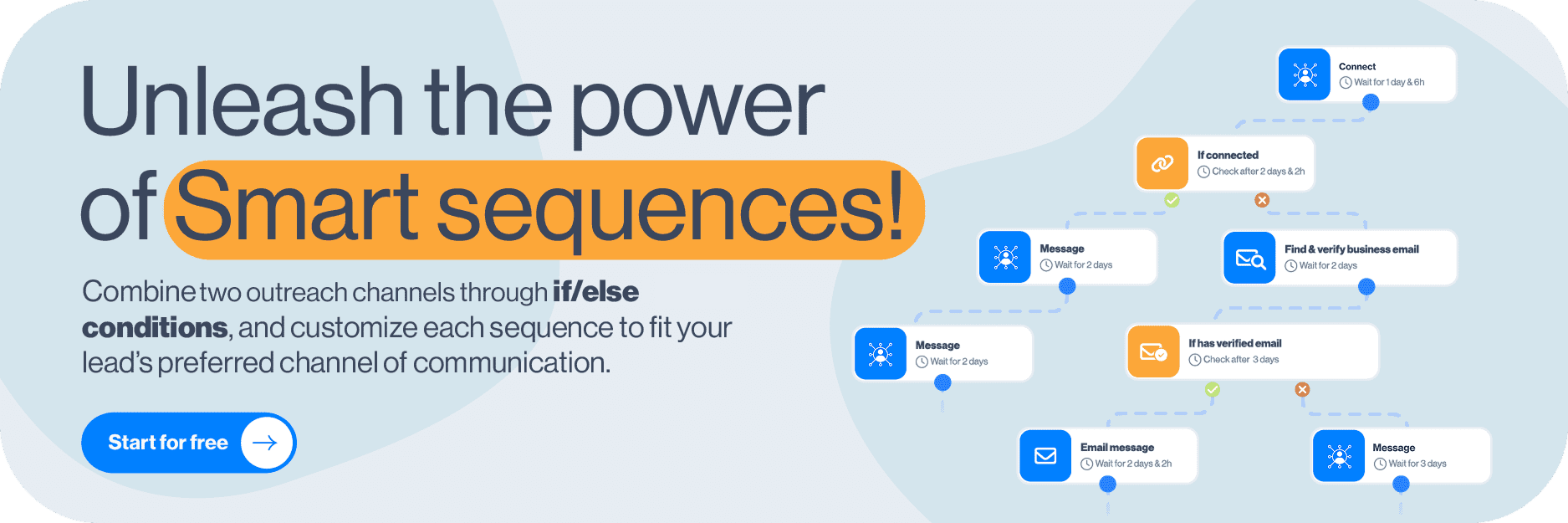
Smart Sequences combine LinkedIn and email actions with if/else logic.
The campaign can change direction based on what happens.
For example, one path can continue after a connection is accepted while another moves to email if the LinkedIn step does not produce the desired result.
4. Sync the information to the CRM
Skylead has direct integrations with HubSpot, Pipedrive, and Salesforce.
That creates a cleaner division:
Skylead
→ Prospect
→ Enrich
→ LinkedIn/email outreach
→ Reply
→ Meeting
Pipedrive or HubSpot
→ CRM record
→ Opportunity
→ Pipeline
→ Revenue
The AI SDR can also handle or assist with replies and guide interested prospects toward meetings in automatic or semi-automatic mode for that workflow.

This setup is not necessary for every company, though.
If HubSpot already receives enough qualified inbound demand, adding another prospecting layer may not solve anything.
If Pipedrive is being used mainly for referrals or relationship-driven sales, the same applies.
But if reps are spending a meaningful part of their week building prospecting lists and running outbound, it is worth separating that problem from the CRM decision.
Which CRM should you choose?
| Your Main Requirement | Better Fit | Why |
| Visual pipeline is the center of daily work | Pipedrive | Deals and activities remain front and center |
| Keep leads separate until qualified | Pipedrive | Leads Inbox creates a clean lead-to-deal handoff |
| Sales email, sequences, and straightforward automation | Pipedrive | Growth provides the core workflow at a lower price |
| Central workspace for tasks, prospects, and deals | HubSpot | Sales Workspace brings more work together |
| Rich customer history around the CRM record | HubSpot | More teams and Hubs can contribute context |
| Broader CRM workflow automation | HubSpot | Workflows extend beyond a simple sales pipeline |
| Sales and marketing operate closely together | HubSpot | Customer and marketing data can live around the same CRM |
| Heavy outbound before prospects enter the CRM | Skylead + either CRM | Dedicated prospecting and engagement can sit before the CRM |
- Choose Pipedrive if you want reps working primarily from leads, deals, activities, email, and a visual pipeline.
- Choose HubSpot if the salesperson needs a wider working environment and the CRM is shared more deeply across marketing and other customer-facing functions.
- Use Skylead alongside either CRM when finding and engaging new prospects is a major part of your team’s sales process.
Frequently asked questions
Is Pipedrive easier to use than HubSpot?
For a sales-only workflow, Pipedrive is generally easier to understand because the product stays close to leads, deals, activities, email, and the pipeline. HubSpot's Sales Workspace simplifies daily sales work, but the overall platform contains more tools, records, and configuration options.
Which is cheaper, Pipedrive or HubSpot?
Pipedrive is generally cheaper for a sales team that needs email sync, sequences, automation, and forecasting. Growth currently costs $39 per seat/month billed annually. HubSpot Professional currently starts at $90 per sales seat/month billed annually and requires a $1,500 onboarding fee.
Does Pipedrive have sales sequences?
Yes. Sequences are available on Growth and higher plans. They let reps create repeatable workflows using emails and follow-up activities for leads and deals.
Does HubSpot have a visual deal pipeline?
Yes. HubSpot supports deal pipelines and lets professional and enterprise users manage deals from Sales Workspace. Pipedrive simply makes the visual pipeline a more central part of the overall product experience.
Which CRM is better for marketing and sales alignment?
HubSpot is usually the stronger choice when marketing and sales need to work around the same customer data, automation, and lifecycle information. Pipedrive can connect with marketing tools, but its core product remains more focused on sales execution.
Can Skylead work with Pipedrive and HubSpot?
Yes. Skylead provides a real-time CRM sync with both Pipedrive and HubSpot. Teams can run prospecting and multichannel outreach in Skylead while keeping opportunity and customer management inside their CRM.
The bottom line: Pipedrive vs HubSpot?
Choose Pipedrive for a focused sales CRM or HubSpot for closer coordination across sales, marketing, and other customer-facing teams.
Either way, your pipeline needs prospects worth pursuing. Skylead fits into that earlier stage, helping your team find and engage prospects before they become qualified opportunities. Pair it with your chosen CRM to connect outbound prospecting with the deal management and customer relationships that follow.
| Keep Your CRM. Build the Pipeline Before It. Find accounts, enrich the right contacts, run LinkedIn and email outreach, manage replies, and sync qualified activity back into your CRM. Start your free Skylead trial |