Dripify vs Lemlist: Which Is Better for Booking More Sales Meetings?
Your sales team is sending LinkedIn requests, running email campaigns, and getting replies. But how many of those conversations actually turn into booked meetings?
For sales teams and agencies, the challenge goes beyond automating outreach. Finding qualified prospects, getting accurate contact information, managing follow-ups, and responding to interested leads all take time. When these activities happen across different tools, your team spends more time managing the process than moving prospects toward a sales call.
That's why choosing between Dripify and Lemlist requires looking beyond their automation features. The real question is how much of your outbound process each platform can handle, and how much work still falls on your sales team.
| Quick Answer: Choose Dripify for affordable LinkedIn-first automation with email follow-ups. Choose Lemlist for email-first outreach, built-in prospecting, and calling features. Consider Skylead if you need B2B prospecting, conditional LinkedIn and email automation, AI enrichment, and an AI SDR that handles replies through to meeting booking. |
We'll compare their features, pricing, account-management requirements, and the steps each platform covers between finding a prospect and booking a sales meeting.
Dripify vs Lemlist at a Glance
| Feature | Dripify | Lemlist |
| Best for | LinkedIn-first outbound teams | Email-first multichannel teams |
| Starting monthly price | Pro $79/user | Email $69/month |
| LinkedIn-enabled pricing | Pro $79; Advanced $99 | Multichannel $109/user |
| LinkedIn automation | Cloud-based | Browser/Chrome extension-based workflows |
| Email outreach | Built into sequences | Native email automation |
| B2B database | No comparable built-in database | Built-in 650M+ lead database |
| Email finding | Credit-based | Finder and enrichment options |
| Personalization | Variables and sequence customization | Images, AI agents, and custom variables |
| Calling | Not a core native feature | Built-in dialer and call tasks |
| Reply management | Dedicated inbox | Unified inbox and AI-assisted features |
| Best reason to choose | Focused automation at a lower price | Broader outreach capabilities |
Prices are monthly, excluding credits and add-ons. Annual billing and enterprise agreements may change the cost.
The fundamental difference is straightforward: Dripify concentrates on LinkedIn-led campaigns, while Lemlist gives sales teams more ways to find and contact prospects.
Neither subscription price tells you how much work remains after someone replies.
Dripify: A Focused Tool for LinkedIn-Led Sales
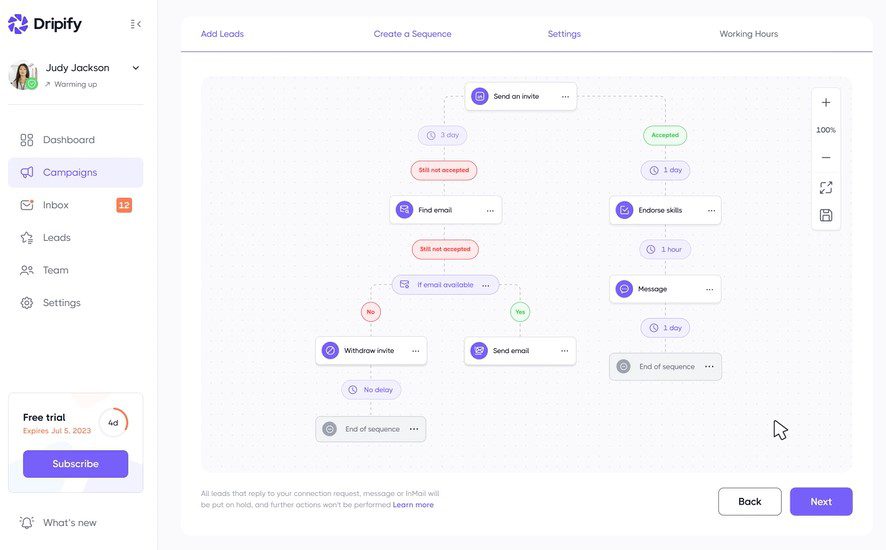
Dripify is designed for teams that already use LinkedIn to identify prospects and want to automate repetitive outreach tasks.
Its cloud-based campaigns can combine LinkedIn connection requests, messages, and email follow-ups. Representatives can monitor campaign activity and manage incoming conversations from a dedicated inbox.
Where Dripify Works Well
- LinkedIn and email sequences: Combine outreach actions without purchasing a separate multichannel plan.
- Lower starting price: Pro costs $79/month, while Advanced costs $99/month per user.
- Cloud-based campaigns: Automation doesn't depend on keeping a browser window open.
- Email finder: Identify business email addresses using included credits and paid top-ups.
- Campaign management: Monitor outreach activity, replies, and campaign performance.
Advanced includes additional controls for testing, team management, and campaign activity.
For example, a founder with an existing Sales Navigator prospect list can use Dripify to organize connection requests and follow-ups instead of sending every message manually.
Where Dripify Creates Additional Work
Dripify doesn't provide a comparable built-in B2B company and contact database. You still need a reliable source of qualified leads.
Its email finder also uses credits, so contact-data expenses increase with usage.
More importantly, Dripify helps generate and organize conversations, but representatives remain responsible for converting interested replies into meetings.
For teams with a dedicated SDR managing those conversations, that may be perfectly acceptable. For smaller teams where one person handles prospecting, outreach, and sales calls, it can become another responsibility.
Best fit: Teams with established prospect lists, LinkedIn-led outreach, and people available to manage interested replies.
Lemlist: More Channels and Prospecting in One Platform

Lemlist starts with email outreach and extends into prospecting, LinkedIn automation, SMS, calling, and AI-assisted sales workflows.
Its Email plan starts at $69/month for 50,000 emails, with unlimited users. LinkedIn automation requires the Multichannel plan, which costs $109 per user/month.
Where Lemlist Works Well
- Built-in lead database: Search a database advertised at more than 650 million leads.
- Email personalization: Build campaigns using variables, images, AI-assisted research, and customized messages.
- Deliverability tools: Access Lemwarm, warm-up, and email deliverability features.
- LinkedIn outreach: Add LinkedIn actions to Multichannel campaigns.
- Calling and tasks: Use its dialer and call tasks to incorporate phone outreach.
- AI tools: Use lemAgent and other AI capabilities for research, enrichment, and messaging.
For a small sales team that uses email as its primary channel, these features can reduce the need for separate prospecting and communication tools.
Where Lemlist Creates Additional Work
The Multichannel plan costs more per user than Dripify's Pro and Advanced plans.
Lemlist's LinkedIn workflows also use a Chrome extension and browser-based connections. That introduces additional account-setup considerations, particularly when teams manage multiple LinkedIn profiles.
Although the lead database is included, verified contact enrichment and certain buying-signal features use priced credits or add-ons separately.
Lemlist also provides AI-assisted reply capabilities, so it shouldn't be described as purely manual. However, having AI assistance and a unified inbox doesn't automatically mean every interested prospect will be handled through meeting booking without representative involvement.
Best fit: Email-first sales teams that want built-in prospecting, LinkedIn actions, and calling alongside their existing sales process.
The Reply Ownership Test: Who Turns Interest Into a Meeting?
Most sales automation comparisons focus on messages sent, channels supported, or contact limits.
Those details matter, but a sales leader also needs to know what happens after a prospect replies.
Consider this common situation:
A prospect responds to your campaign with, "This sounds interesting. Can you share pricing and explain how it works?"
The campaign has generated interest. But someone still needs to answer the question, determine whether the prospect is qualified, and move the conversation toward a meeting.
That is the purpose of the Reply Ownership Test.
How Each Tool Handles the Next Step
Dripify and Lemlist help teams start conversations, but turning those replies into booked meetings often requires additional work. This is where Skylead offers another approach. Alongside LinkedIn and email automation, Skylead provides a trainable AI SDR that can respond to prospects, handle follow-ups, and guide conversations toward meeting bookings.
To understand the difference, let's compare how all three platforms handle each stage after a prospect replies.
| Situation | Dripify | Lemlist | Skylead |
| Prospect replies | Dedicated inbox | Unified inbox and AI-assisted tools | Smart Inbox and AI SDR |
| Prospect asks a question | Representative handles conversation | Representative or supported AI workflow | Trainable AI SDR can respond |
| Prospect needs qualification | Representative-led process | Sales workflow and AI-assisted capabilities | AI SDR can continue qualification |
| Prospect is ready to meet | Representative arranges next step | Calling, tasks, and sales workflows | AI SDR can guide conversation to booking |
| Agency manages many replies | Team handles conversations | Team workflow and AI tools | AI SDR can operate across client campaigns |
The table compares available workflows, not guaranteed meeting outcomes. AI features and human-approval requirements depend on configuration and plan.
What This Means for Your Team
Dripify fits when your representatives own the replies. Its automation helps initiate conversations, while salespeople take responsibility for qualification and booking.
Lemlist fits when representatives use several channels to move deals forward. Its calling, task management, inbox, and AI capabilities support a broader sales workflow.
Skylead is worth considering when you want AI to take on more of the conversation itself. Its trainable AI SDR can handle LinkedIn and email replies, continue discussions using company knowledge, and work toward booked meetings.
This difference becomes more important as your team or client base grows.
An agency managing three campaigns may comfortably handle replies manually. An agency managing 25 clients needs to consider how much staff time is spent answering similar questions across accounts.
Three Questions to Ask Before Buying
- Who responds when a prospect shows interest? Determine whether representatives, AI assistance, or an AI SDR will handle the conversation.
- How quickly can the next action happen? Review how the platform routes replies, identifies interested leads, and supports follow-up.
- What happens when your campaign volume doubles? Consider whether conversation management requires more staff, different workflows, or additional software.
The right choice depends on where your current sales process needs help.
A tool that generates more replies isn't automatically the one that books more meetings.
When Does Skylead Make More Sense?

Dripify is focused on LinkedIn-led outreach. Lemlist combines more sales channels and AI-assisted workflows.
Skylead brings account-based prospecting, AI enrichment, conditional LinkedIn and email automation, and AI-powered conversations together.
For teams evaluating the entire outbound process, four capabilities deserve attention.
1. Account-Based Prospecting and Post Signals
Skylead includes a built-in B2B database for finding companies and decision-makers.
Teams can research target accounts, filter contacts by their ideal customer profile, and move qualified prospects directly into campaigns.
Post Signals adds interest-based discovery by identifying people publishing or engaging with relevant LinkedIn posts.
This helps teams move beyond static lead lists and find prospects who are actively discussing relevant topics.
2. AI Data Enrichment and Smart Sequences
Skylead connects with more than 20 data providers and supports AI data enrichment, custom prompts, and personalized icebreakers.
According to Skylead, enrichment credits are priced according to underlying provider costs without an additional profit margin. The credits are billed separately, and actual expenses depend on usage.
Its Smart Sequences combine connection requests, LinkedIn messages, InMails, and email with if/else conditions.
For example, teams can follow different outreach paths based on whether a prospect accepts a connection request or responds to a message.
Skylead also includes email warm-up and supports unlimited connected email accounts. Its standard plan lists 100,000 emails per month.
3. Trainable AI SDR for Replies and Booked Calls
Skylead's AI SDR is designed to handle prospect conversations from the first reply through to a booked call.
It uses three main inputs: product knowledge, a sales strategy, and AI Training Sets.
Teams can review and provide feedback on AI-generated messages to improve how the AI SDR responds. Automatic and semi-automatic operation allows different levels of human oversight.
For agencies, Training Sets can also preserve proven messaging approaches while restricting clients from accessing the underlying training material.
AI SDR is a paid add-on, so teams should include expected credit consumption in their budget.
4. Agency Pricing and White-Label Services
Skylead offers agency-specific functionality beyond outreach campaigns.
Its offering includes centralized client dashboards, granular permissions, white-label branding options, branded customer support, a Help Center, multilingual in-app guidance, and dedicated success management.
Agencies can also use API integrations and Google Tag Manager for supported customization and tracking requirements.
The currently advertised first-year agency packages are $999/month for up to 25 seats and $1,999/month for unlimited seats. White-label features are available under the applicable agreement.
For agencies planning to manage many client campaigns, these capabilities may matter as much as the subscription price.
Dripify vs Lemlist vs Skylead: Pricing by Team Size
For teams evaluating LinkedIn-enabled plans, the published monthly prices provide a useful starting point.
| Seats | Dripify Pro | Dripify Advanced | Lemlist Multichannel | Skylead |
| 1 | $79 | $99 | $109 | $100 |
| 3 | $237 | $297 | $327 | $300 |
| 10 | $790* | $990* | $1,090 | $999 agency plan** |
| 25 | $1,975* | $2,475* | $2,725 | $999 agency plan** |
*Dripify totals at 10 and 25 seats are calculated using published individual rates, not custom enterprise quotes.
**Skylead's $999/month agency package covers up to 25 seats for eligible agencies and is advertised as a first-year promotion. Ten standard seats would otherwise total $1,000. Confirm eligibility and renewal pricing.
Which Platform Offers Better Value?
For one representative who already has prospect data, Dripify Pro provides a lower-cost LinkedIn-enabled starting point.
For an email-first team, Lemlist's price includes a broader set of prospecting and communication tools.
Skylead becomes particularly relevant when an eligible agency can use its flat-rate package. At 25 seats, the advertised monthly base price is $999, compared with $2,725 for 25 Lemlist Multichannel users.
That doesn't mean the subscriptions deliver identical functionality or operating costs.
Dripify may require an additional lead source. Lemlist uses credits for certain enrichment features. Skylead charges separately for AI data enrichment and AI SDR.
Before selecting a tool, estimate the complete cost of prospecting, outreach, reply handling, and client management.
LinkedIn Account Management: What Should You Check?
LinkedIn account safety should be part of the purchasing decision, particularly when a team manages accounts for clients.
LinkedIn's policies prohibit unauthorized third-party automation. No automation provider can guarantee protection from account restrictions.
The platforms use different approaches:
- Dripify: Cloud-based automation, activity scheduling, and configurable limits.
- Lemlist: LinkedIn workflows using a Chrome extension and browser-based connections.
- Skylead: Cloud-based LinkedIn automation with dedicated country-based IPs, warm-up features, and activity controls.
Skylead and Dripify offer cloud-based approaches, while Lemlist introduces browser-session management considerations.
However, neither setup is inherently risk-free. Account activity, LinkedIn policies, and individual restrictions still matter.
For decision-makers: Review the platform's connection method, account-management controls, support procedures, and risks before authorizing automated activity on company or client accounts.
Which Tool Should You Choose?
Rather than choosing based on the longest feature list, start with your primary operational requirement.
| Your situation | Best fit | Why |
| You have lead lists and need LinkedIn automation | Dripify | Focused workflows at a lower starting price |
| Email is your primary outreach channel | Lemlist | Native email and personalization |
| You want calling alongside email and LinkedIn | Lemlist | Dialer, tasks, and multichannel features |
| You need account-based prospecting and outreach together | Skylead | Built-in B2B database and prospecting |
| You want conditional LinkedIn and email campaigns | Skylead | Smart Sequences with if/else logic |
| You want AI to manage replies through booked meetings | Skylead | Trainable AI SDR |
| You manage many clients under your own agency brand | Skylead | Flat agency pricing and white-label options |
These are best-fit recommendations, not guarantees of campaign performance.
Frequently Asked Questions
1. Is Dripify or Lemlist Better for LinkedIn Outreach?
Dripify is more focused on cloud-based LinkedIn automation with email follow-ups. Lemlist suits teams that prioritize email and use LinkedIn as another channel. Skylead is also worth considering for cloud-based LinkedIn and email automation with conditional Smart Sequences.
2. Which Tool Is Cheaper, Dripify or Lemlist?
Dripify Pro starts at $79/user/month and Advanced at $99, while Lemlist Multichannel costs $109/user/month. Lemlist's $69 Email plan doesn't include LinkedIn automation. Compare the required features and additional services before making a decision based on subscription costs.
3. Does Lemlist Support Automated Phone Calls?
Lemlist provides a built-in dialer and call tasks that representatives can use within multichannel workflows. These features shouldn't be described as automatically placing every phone call. The sales representative remains involved in the calling process.
4. Can Skylead Automatically Handle Sales Replies?
Skylead's AI SDR can manage incoming LinkedIn and email conversations, respond using configured product knowledge and sales strategy, and guide interested prospects toward booked meetings. Automatic and semi-automatic modes are available, with AI credits charged separately.
5. Which Tool Is Better for Sales Agencies?
Dripify suits agencies running straightforward LinkedIn campaigns. Lemlist supports email-first multichannel outreach. Skylead is relevant for agencies that also need B2B prospecting, enrichment, AI SDR, flat pricing, client permissions, and white-label support.
The Bottom Line
Choose Dripify if you want a focused, lower-cost way to run LinkedIn and email sequences and already have people managing prospect replies.
Choose Lemlist if email is your main channel and your sales team needs prospect data, personalization, LinkedIn actions, and calling in one platform.
Consider Skylead if your objective is to manage more of the sales process in one place, from B2B prospecting and conditional outreach to AI-powered conversations and booked meetings.
Before purchasing, identify who currently owns prospect replies and how interested leads reach your calendar. That will tell you whether your main requirement is outreach automation, broader sales functionality, or more automated conversation management.
From Prospect Discovery to Booked Meetings
Find qualified accounts, enrich lead data, automate LinkedIn and email outreach, and manage conversations with Skylead's trainable AI SDR.